Here is how to setup a client profile in Mosyle to authenticate Wifi against MS Network Policy Server (NPS) using certificates automatically obtained from MS Network Device Enrollment Services (NDES) using Simple Certificate Enrollment Protocol (SCEP). Not sure where the “simple” part is…and I don’t want to see the “hard” version!
Prepare
- Create a service account in Active Directory that will request certificates.
- Deploy Server for CA role or use existing.
- Deploy Server for NDES role.
Part 1: The Certificate Authority
- You can use an existing or install a new certificate authority role. If starting new then install the CA role from add remove features. On the configure screen just add the CA role. The ndes role will be on a separate server.

- MS CA defaults to 2 year max certificate duration. To increase this increase ValidityPeriodUnits at [HKEY_LOCAL_MACHINE\SYSTEM\ControlSet001\services\CertSvc\Configuration\] and restart the CA service
Part 2: The certificate template:
Open Certificate Template Console from the Certificate Authority console and duplicate the user Template. Call it something meaningful, like “NDES Template”. You’ll need to remember that later.


Configure your new certificate template to look like these screens, be sure to add your service user on the security tab with read and enroll rights.


Part 3: The NDES Server
Again install the certificate authority role from roles and features, but when asked to configure the role only install the NDES portion. Accept the defaults for additional services to add and add the Request filtering feature under IIS>Security:

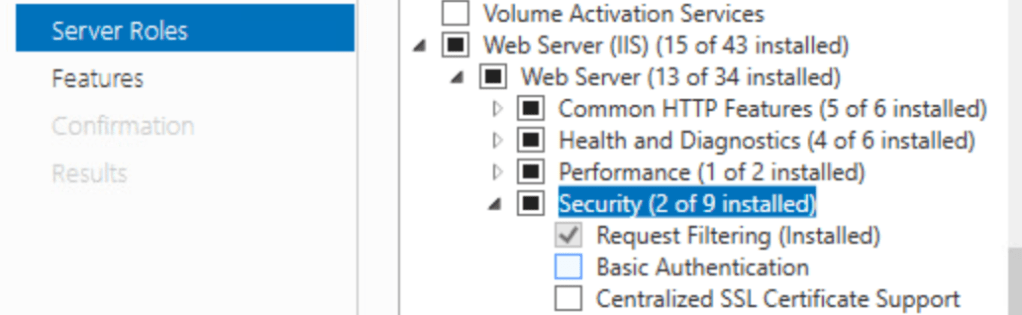
- Add the service account to the IIS_IUSR group
- Important!: Log the NDES server in once as the service account
- Set the SPN of the service account:
- setspn -s http/<DNS name of the computer that hosts the NDES service> <Domain name>\<NDES Service account name>
- ex: setspn –s http/Server01.contoso.com contoso\NDESService
- Complete the NDES setup from Server Manager
- Registry Changes:
- Add your NDES template Name (remove the spaces if there are any).
- Add DisableRenewalSubjectNameMatch (can’t remember why that was necessary…you look it up!)
- Set UseSinglePassword to 1. This stops the rolling of the challenge password, which Mosyle does not support
- You may need to set “Load User Profile” to True in the Advanced Settings of the SCEP Application Pool in IIS


- Increase the url length in IIS and Registry:
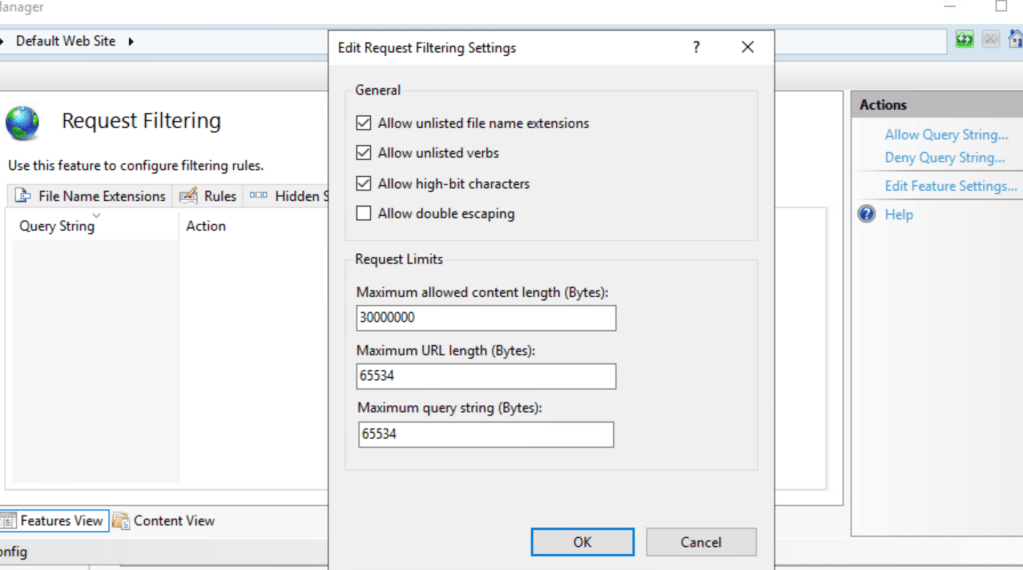

- Acquire a Client And Server authentication certificate form your CA and bind your iis site to it. These can be separate or combined.
Part 4: Mosyle Configuration
This will all be configured under Multi-CertWiFi
- Add a new profile and give it a name.
- You will need at least 3 profiles inside of this profile container:
- Certificate
- This one is easy, just add the root cert (no key, export der in pem format from ca) so the certs are trusted
- SCEP
- Your SCEP url is something like http[s]://ndes.domain.com/certsrv/mscep/mscep.dll
- Subject: CN=%FullName%
- SAN Type: DNS Nme
- SAN name: blank
- NT Principal: %UserId%@domain.com
- Challange: Obtain from http[s]://ndes.domain.com/CertSrv/mscep_admin/
- If the reg keys above were set this will stay static, otherwise it will rotate every 60 minutes or after any successful certificate registration
- Mosyle does not support obtaining the rolling code, so we use static.
- Fingerprint: Also from http[s]://ndes.domain.com/CertSrv/mscep_admin/
- WiFi
- Certificate

Part 5: NPS
I had an existing NPS server so I had a head start there, here are some screenshots that might help. Also check the events in the NAP screen in server manager for relevant events.


Make sure to edit the EAP type and bind it to the correct certificate.
Conclusion:
I think that’s about it. Here are some resources that I followed:
- NDES and SCEP:
- https://www.petenetlive.com/KB/Article/0000947
- https://techcommunity.microsoft.com/t5/intune-customer-success/support-tip-how-to-configure-ndes-for-scep-certificate/ba-p/455125
- https://docs.microsoft.com/en-us/mem/intune/protect/certificates-scep-configure
- The logging in a service account nugget: https://knowledge.broadcom.com/external/article/155634/scep-server-shows-a-500-error-when-tryin.html
- NPS:
- Troubleshooting:

 Andy's Brain